 PickGlobe
📹 Quick answer
Start with the front door, driveway, rear entrance, and any side gate that provides access to your home. Mount each camera where it can capture useful detail—not merely a sweeping view. Avoid glare, blocked sightlines, and cameras pointed into private spaces.

A camera is only useful when its footage answers a question: Who approached the door? Which way did they go? What happened near the car? The best position depends on that purpose, your camera's lens, available lighting, and the privacy of everyone nearby.
🟢 Best camera locations, ranked by usefulness
| Location | What it helps capture | Placement tip |
|---|---|---|
| Front door or porch | Visitors, packages, arrivals | Frame faces approaching the door; avoid a steep overhead-only view. |
| Driveway or garage approach | Cars, people approaching vehicles | Include the walking route and parking area, not just the street. |
| Back door or patio | Rear entry and outdoor activity | Check nighttime lighting and backlighting from doors. |
| Side gate or narrow passage | Movement through a less visible access point | Aim along the path rather than across a fence. |
| Ground-floor common area | Movement after an entry | Prefer entrances or hallways, not private rooms. |
Prioritize coverage over camera count. Two cameras aimed at different entry routes may tell you more than four cameras recording the same driveway.
🔴 The worst camera positions—and why they fail
| Avoid | What goes wrong | Better alternative |
|---|---|---|
| Directly into rising or setting sun | Backlighting, flare, washed-out detail | Shift the angle or use an overhang; test at the problem hour. |
| Behind ordinary window glass | Reflections and infrared glare at night | Use an outdoor-rated camera outside, or disable IR and test. |
| Behind leaves, railings, or decorations | Blind spots and false motion alerts | Move the lens clear of seasonal growth. |
| So high that people are tiny | Great overview, poor identifying detail | Lower or supplement with a face-level approach view. |
| Within easy reach | Greater tampering risk | Use a secure mount and protected cable route. |
| Facing neighbors' private spaces | Privacy concerns and possible legal issues | Tighten framing or use privacy masks. |
| Bedrooms, bathrooms, changing areas | Serious privacy intrusion | Do not install cameras in intimate spaces. |
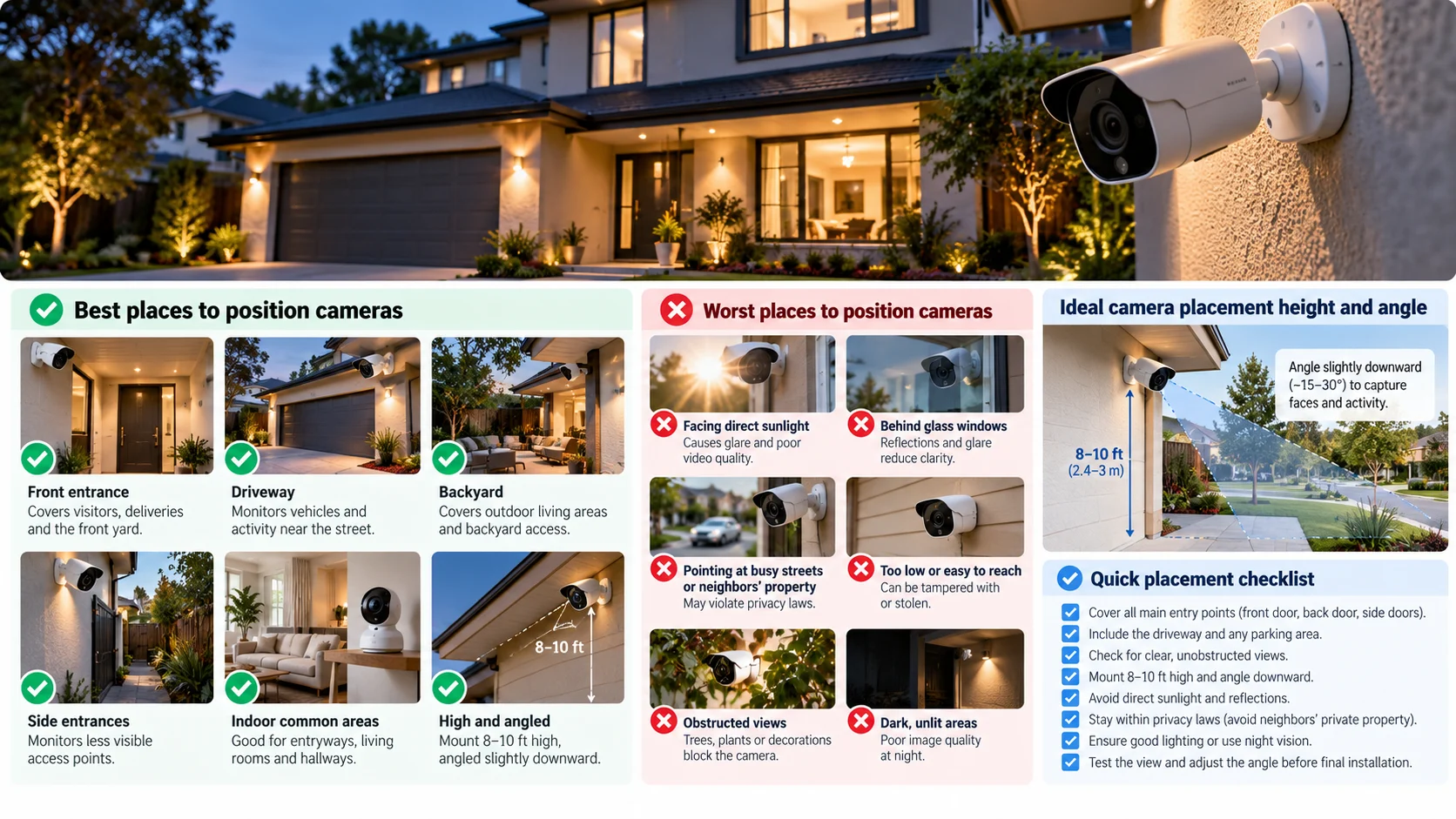
Illustration: AI-generated. Examples are illustrative: the right mounting angle and height vary with lens, property layout, and the detail you need. The two pictures in this guide show slightly different downward-angle ranges (15–30° and 10–30°), which is one more reason to follow your camera maker's instructions and test the view.
📐 How high should you mount a security camera?
About 8–10 feet (2.4–3 meters) is a common starting point for many exterior installations, not a universal rule. At that height, a camera can be harder to reach while still seeing the approach. But mounting too high often produces a clear view of someone's head and a poor view of their face.
A modest downward tilt can help, but there is no single correct angle for every lens. Wide-angle cameras, doorbells, and long-range cameras need different framing. Follow the manufacturer's guidance and test actual footage at the distances you care about.
Try this before drilling: Have someone walk toward the door, pause where a package might be left, and approach a parked car. Review clips in daylight and darkness. Can you distinguish their face and actions? If not, adjust the camera—not just the recording resolution.
🏠 Indoor cameras: useful coverage without unnecessary surveillance
Entry halls and shared living areas may be useful when occupants agree to the setup. Avoid bedrooms, bathrooms, and other spaces where people reasonably expect privacy. Be especially careful with audio: recording-consent laws differ by jurisdiction. Guests, household members, and workers should understand when recording is occurring.
⚠️ Four mistakes people overlook
- Assuming night vision fixes darkness. Infrared has limits; reflective walls and nearby objects can wash out footage.
- Ignoring Wi-Fi or power. Test connectivity and battery performance at the proposed location before mounting.
- Recording too much street or neighboring property. Frame only what is necessary and use privacy zones where supported.
- Skipping maintenance. Wipe lenses, check spiderwebs, update firmware, and verify that motion alerts and recordings still work.
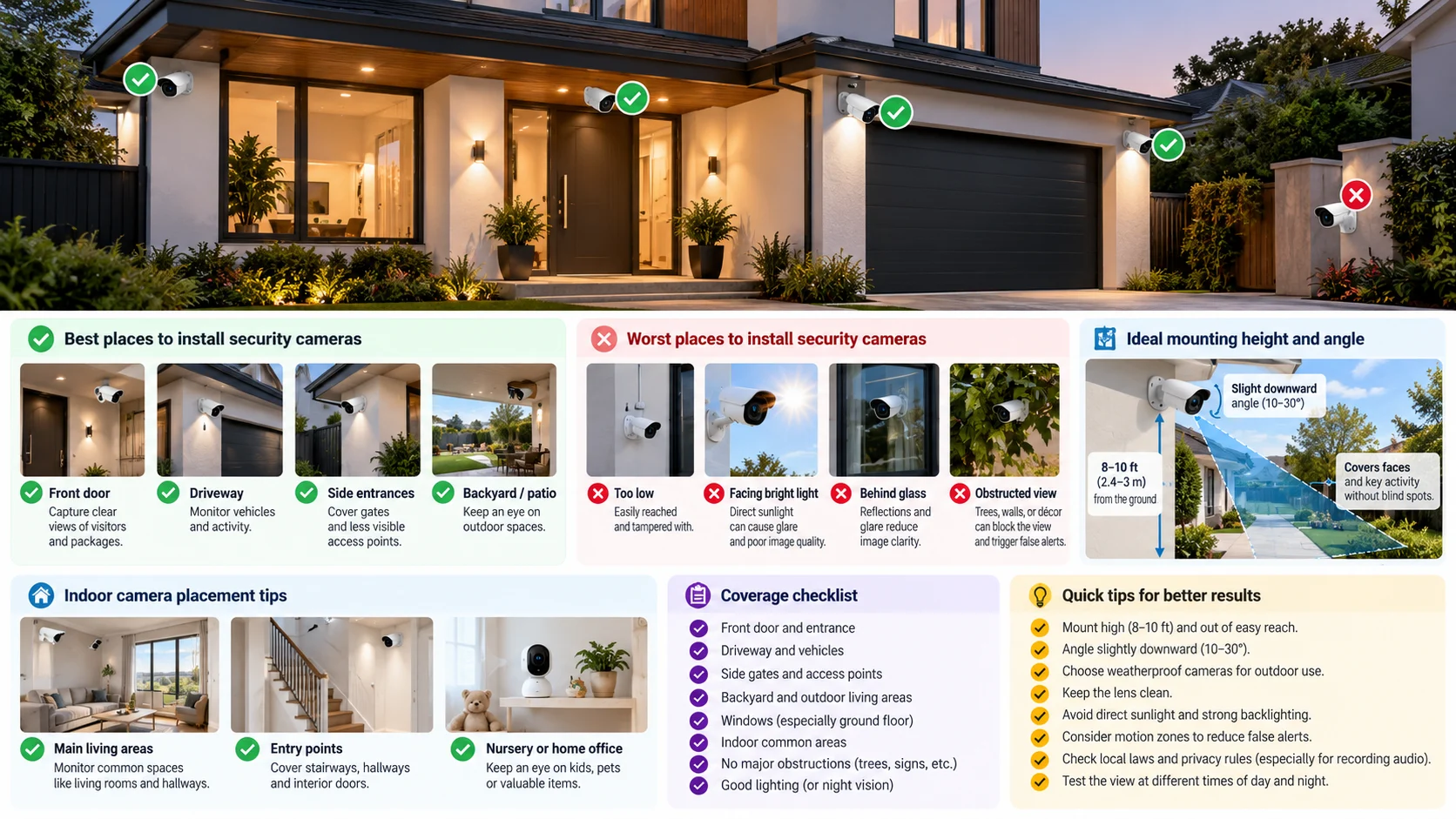
Illustration: AI-generated. The checklist is a visual planning aid; do not treat any depicted angle or mounting height as a universal specification.
✅ A five-minute placement audit
- Stand at each entrance and trace the paths someone could take to reach it.
- Choose a camera view that captures faces or meaningful actions at those paths.
- Check the image at noon, sunset, and night.
- Check for obstructions, glare, weather exposure, power, and connectivity.
- Review privacy boundaries and recording laws before switching on audio.
🎯 Bottom line
Put cameras where events happen and where the resulting footage will be useful. A well-aimed camera at an entry point beats an impressive-looking camera that mostly records sky, glare, or your neighbor's window.
🔗 Related guides
- Wireless vs. wire-free vs. wired (PoE) security cameras
- Smart home security checklist from government advice
- Choosing smart home devices online: compatibility, hubs and privacy
What we could not confirm
- This guide is general installation advice based on how camera lenses, light and privacy work. We did not check it against a specific manufacturer's installation guide or a particular country's law, so confirm mounting height, angle, audio recording and neighbour-privacy rules for your camera and your location.
- We have not tested any camera, doorbell or mount.
Last reviewed: 23 October 2026. No external sources were consulted for this guide.