 PickGlobe
🔌 Quick answer
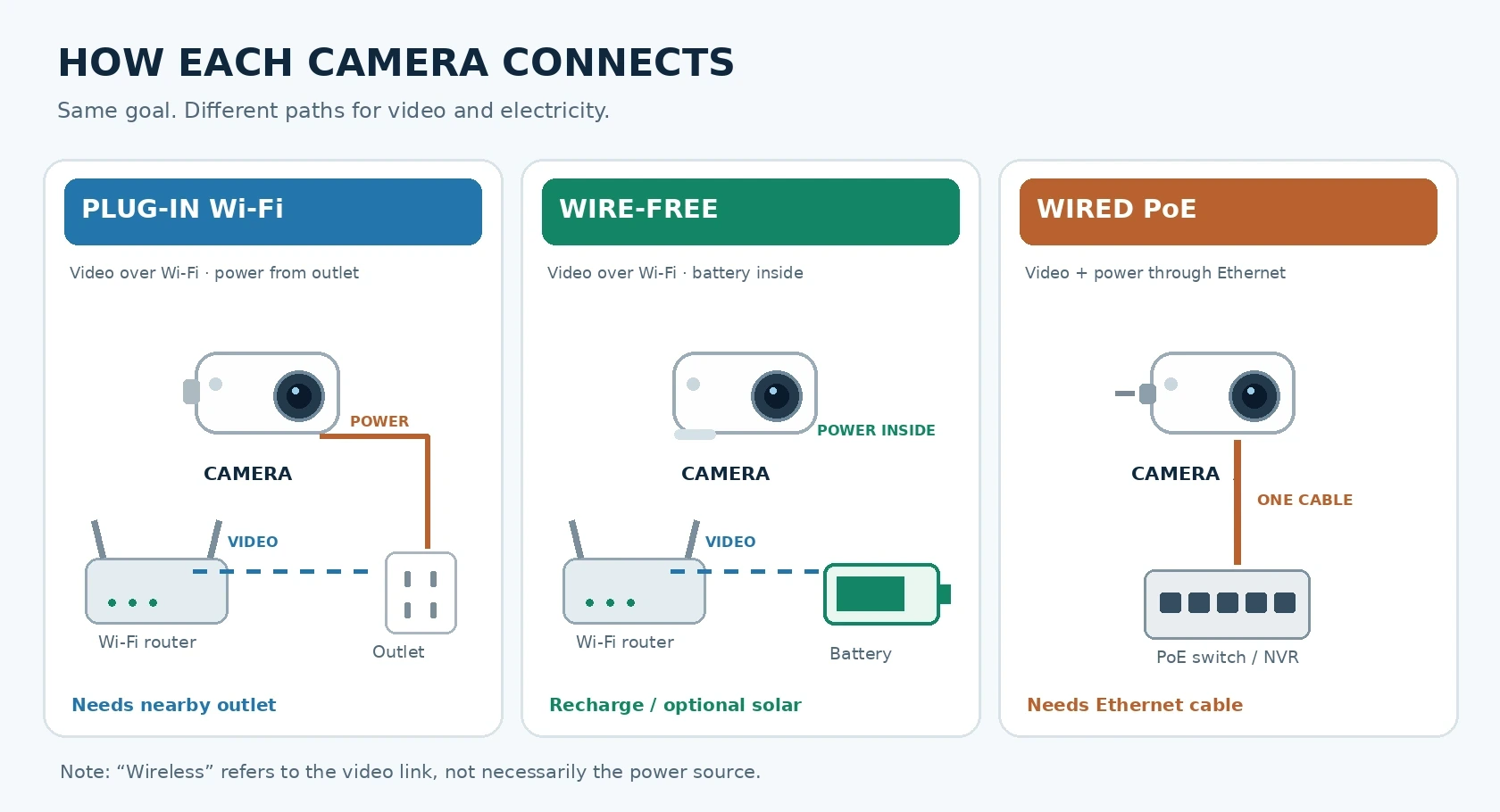
"Wireless" usually means the camera sends video over Wi-Fi, not that it has no cables. A wire-free camera runs on a battery (sometimes topped up by solar). A wired PoE camera uses one Ethernet cable for both data and electricity. The right choice depends less on megapixels and more on where you can get power, how strong your Wi-Fi is, and whether you need continuous recording.
🔌 The three setups, explained
1. Wireless: Wi-Fi video, plugged-in power
A typical plug-in wireless camera sends footage through your Wi-Fi router but still needs an electrical outlet. That makes it relatively easy to install without running Ethernet through walls. Because power is continuous, some models support 24/7 recording, although storage plans and supported features vary. The catch: weak Wi-Fi near a garage, thick wall, or exterior corner can interrupt the feed.
2. Wire-free: battery-powered flexibility
Wire-free cameras usually connect by Wi-Fi while running on rechargeable batteries. Some accept a solar accessory; that does not guarantee endless operation in shade or winter. They are useful on a fence, shed, or rental where running power is inconvenient. To save energy, many primarily capture motion events rather than an uninterrupted timeline. Check wake-up time, clip limits, charging access, and whether the camera needs a hub. Some wire-free models use cellular service instead of Wi-Fi.
3. Wired PoE: one cable, two jobs
Power over Ethernet (PoE) carries electricity and network data over one compatible Ethernet cable. A PoE camera connects to a PoE-capable switch, injector, or recorder. It is a strong fit for permanent multi-camera installations and consistent local recording. The trade-off is planning and installing the cable route. Check that your power equipment supplies the wattage required by the camera; not every Ethernet port provides PoE.
📊 Side-by-side comparison
| Feature | Plug-in wireless | Wire-free battery | Wired PoE |
|---|---|---|---|
| Video connection | Wi-Fi | Usually Wi-Fi; some cellular | Ethernet |
| Power | Wall outlet | Battery; optional solar | PoE switch/injector/NVR |
| Cable at camera | Power cord | None normally | One Ethernet cable |
| Installation | Easy if outlet nearby | Easiest placement | Most cabling work |
| Continuous recording | Available on supported models | Usually event-based | Commonly supported |
| Main limitation | Wi-Fi coverage | Charging and missed events | Cable routing |
| Best fit | Existing homes with outlets | Rentals, gates, awkward spots | Permanent, multi-camera coverage |
Capabilities vary by model. "Wireless" is a marketing term, so always check the actual power source.
🎯 Which should you buy?
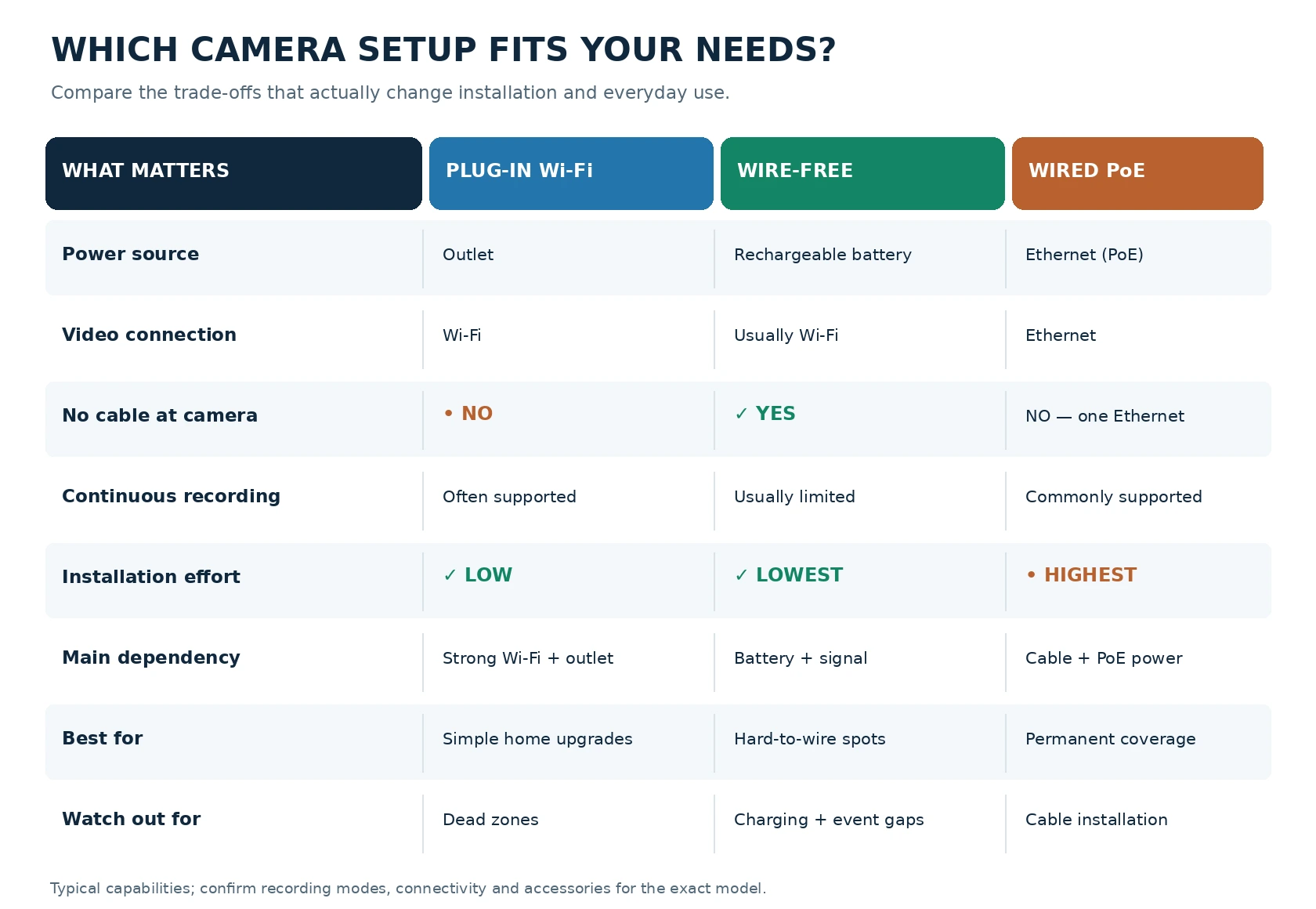
Choose plug-in wireless when you want a simple installation, have a weather-safe outlet, and can verify strong Wi-Fi at the exact mounting point. It is a sensible starting point for a porch or interior room.
Choose wire-free when drilling or cabling is impractical, you only need motion alerts, and you can reach the unit for charging. For a distant gate without Wi-Fi, investigate a compatible cellular model and its data plan rather than assuming any battery camera will work.
Choose PoE when you are renovating, can run Ethernet, want several cameras, or prioritize a stable connection and continuous local footage. An NVR can make a centralized setup convenient, but confirm camera compatibility before mixing brands.
⚠️ Five buying mistakes to avoid
- Assuming wireless means no wires. Read the power specification, not just the product name.
- Assuming every battery camera records 24/7. Check the actual recording modes and whether pre-roll is available.
- Buying before testing the location. Test signal strength and live view where the camera will be mounted, especially after dark.
- Confusing local recording with outage protection. A PoE recorder may work without internet, but power loss stops it unless backed by a suitable UPS. A battery camera can stay powered while its router is down, yet remote access may fail.
- Ignoring ongoing costs. Cloud history, cellular data, batteries, solar accessories, NVRs, and installation can change the total price.
🔒 What about privacy and security?
Connection type alone does not guarantee privacy. Favor strong unique passwords, multi-factor authentication where offered, timely firmware updates, restricted account sharing, and appropriate camera placement. Check whether recordings stay on a microSD card/NVR or require cloud service; some local systems still use internet services for remote viewing.
Bottom line
If you remember one thing, make it this: wireless describes the network, wire-free describes the lack of a power cable, and PoE combines network and power in Ethernet. Start with the location and recording requirement, then choose the camera architecture, not the other way around.
🔗 Related guides
- Where are the best and worst places to position security cameras?
- Smart home security checklist from government advice
- Choosing smart home devices online: compatibility, hubs and privacy
What we could not confirm
- The capabilities above come from manufacturer support and blog pages (Reolink, listed below) and describe typical products. Do not assume a feature from one brand applies to every camera.
- We have not tested any camera, and no prices or battery-life figures are given.
Last reviewed: 23 October 2026. Sources, as listed by the package author and not re-opened by us: Reolink Support, applicable scenarios for different Reolink products; Reolink, wired vs wireless security cameras; Reolink Support, video doorbell cameras. Manufacturer material shows what exists, not independent test results.